Payment Statuses
Last updated: April 22, 2026
Unpaid, Overdue, Pending & Paid Invoices
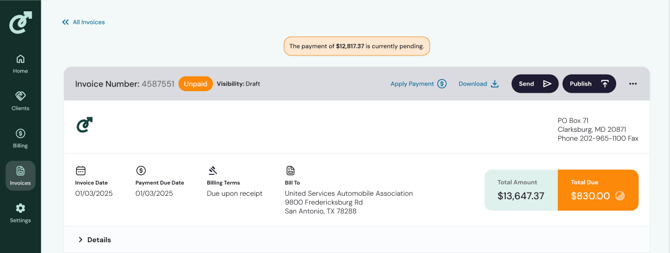
There are three invoice statuses that help to manage payments in Cartwheel: Unpaid, Overdue, and Paid. Pending payments display as a banner on an unpaid or overdue invoice until the status changes (see image).
Unpaid Status
When invoices are in “Unpaid” status, it means the client has received the invoice but has not yet paid. If the invoice is still unpaid once the invoice passes the due date it will automatically update to an “Overdue” status.
Overdue Status
When invoices are in “Overdue” status, it means the client has received the invoice, has not yet paid, and the due date has passed.
Paid Status
Whether the invoice is in “Unpaid” or “Overdue” status, once payment is complete, the status will update to “Paid.” This is the final step in the invoice workflow process. Depending on your implementation, invoices may be marked as “Paid” automatically when your general ledger updates, or you may need to mark them as paid manually.
Pending Payment Banner