Billing Contracts
Last updated: April 6, 2026
Billing contracts can be found on the client detail page. Navigate to the client details page by going to the list of clients and clicking on a client in the list. By default, you will land on the “Billing Contracts” tab. Below is a detailed description of the “Billing Contracts” tab.
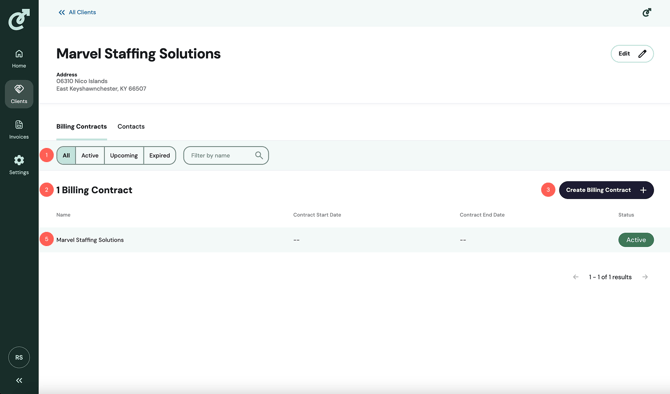
1. Filters
Billing contracts can be filtered by status or name. Billing contract statuses include “Active,” which means the contract is currently in use, “Upcoming,” which means the contract start date is in the future, and “Expired,” which means the contract end date is in the past.
2. Billing Contract Count
The Billing contract count displays the number of billing contracts. If filters are applied, the count will update to reflect the number of matching results.
3. Create Billing Contract Button
Click the “Create Billing Contract” button to create a new billing contract.
4. Billing Contract Table
Each row in the billing contract table will include the name of the billing contract, the start and end dates, and the billing contract status. To view the details of the billing contract, click on the row in the billing contracts table.