Billing Summary List
Last updated: April 6, 2026
You can navigate to the billing summary list by clicking the “Billing” tab in the navigation. From here you can view all the existing billing summaries in your system. Clicking on any row in the billing summary list will take you to the billing summary details page. See below for a detailed description of the billing summary list.
Please note that billing summaries are part of our premium plan, so if you do not have our premium plan enabled you will not see “Billing” in your navigation..
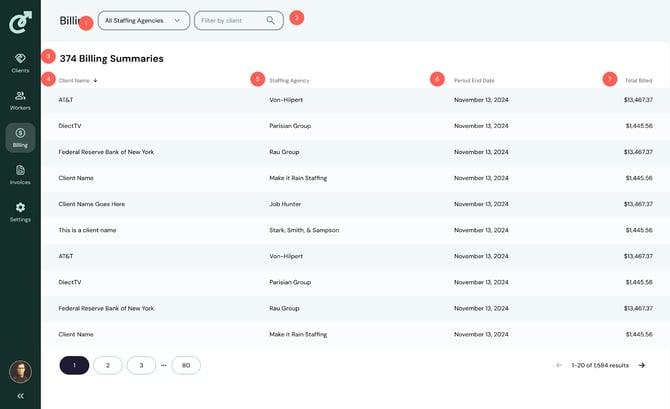
1. Staffing Agency Filter
The staffing agency filter enables you to filter the list of clients by staffing agency. To apply the staffing agency filter, open the dropdown and click on the staffing agency you want to filter to.
2. Client Filter
The client filter enables you to filter the list of billing summaries by client name. Simply type the client name into the filter and the list below will update to only display billing summaries that match your query.
3. Billing Summary Count
The billing summary count displays the number of billing summaries in the system. If the client filter above is applied, this number will update to match the number of matching results from your query.
4. Client Name Column
This column displays the client name that is attached to the billing summary. You can click on the column header to sort the list of billing summaries by the client name.
5. Staffing Agency Column
This column displays the staffing agency the billing summary belongs to.
6. Period End Date Column
This column displays the period end date that is representative of that billing summary. You can click on the column header to sort the list of billing summaries by period end date.
7. Total Billed Column
This column represents the total amount billed in the billing summary.