Resolving an Overpayment or Duplicate Invoice
Last updated: August 17, 2026
Overpayment
An overpaid invoice is one where the amount collected exceeds the invoice amount (for example, a $1,000 invoice paid with $10,000 — often an extra-digit payment error). The excess is placed into unapplied/unallocated cash and needs to be resolved by a person.
For Transactions That Have Already Been Confirmed
Navigate to Invoices
Sort invoices by clicking on Total Outstanding to reverse-sort by lowest balance.
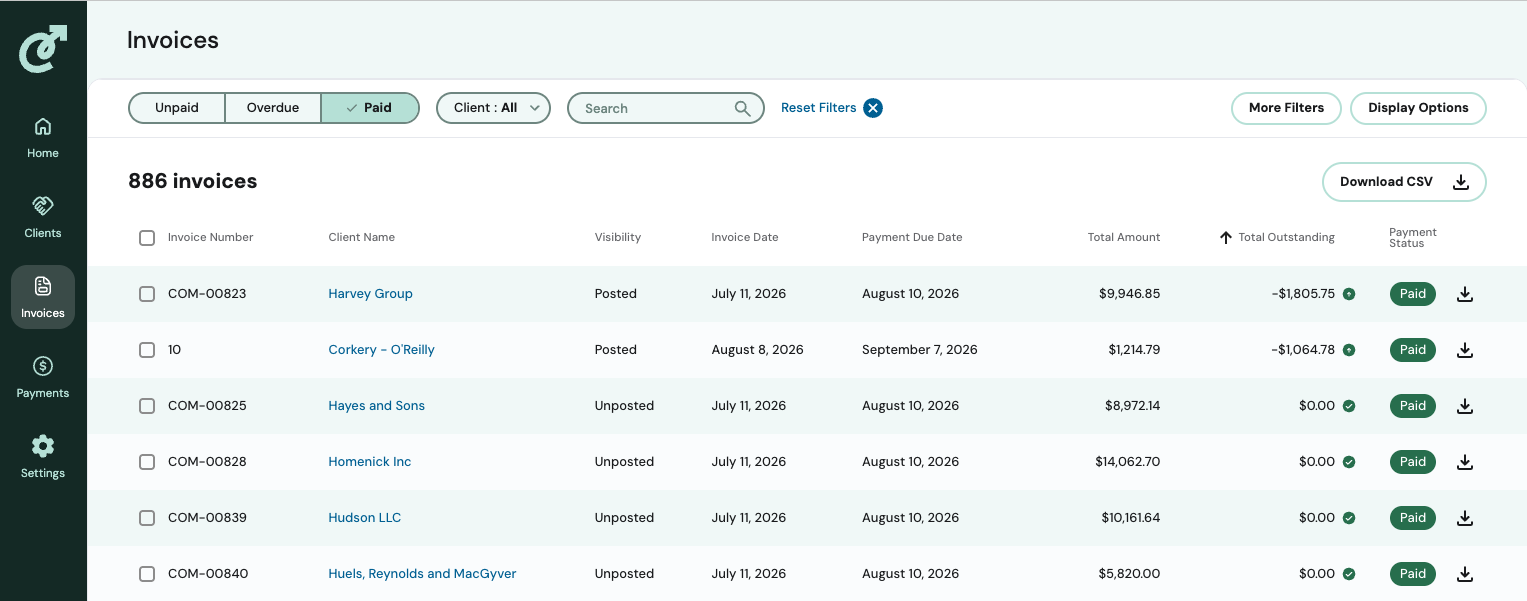
There you will see any overpaid invoices at the top.
Resolve an Overpayment for a Confirmed Transaction
You can Transfer the Credit
Refund the excess amount back to the client. See Recording a Refund in Cartwheel.
For Transactions That Are Unconfirmed
Allocate the excess to other open invoices for the same client — follow the existing steps in Manual Payment Allocation.
Once resolved, the transaction moves to Confirmed status.
Duplicate Payment
A duplicate payment is the same invoice number paid twice. Cartwheel doesn't have a separate "duplicate" status — it's treated the same as an overpayment.